
Reference · How the Gemini API free tier works
Is the Gemini API free tier actually free?
Short answer: yes, it's really free — $0, no card. There are still real limits and a data trade-off worth knowing, so here's how it actually works, with every sentence linked to the specific Google page it comes from.
Straight answer: this doesn't cost money. If Bedside English pointed you to this page and you're wondering whether the app quietly went paid — it didn't. A Gemini API key is issued for free, directly by Google, with no credit card and no trial clock attached.
Nothing here charges you automatically. You'd only ever be billed if you deliberately went into Google's own billing settings and turned on a paid tier yourself — and once you do, that project's free tier is gone: every call is billed from then on, not just the usage above what the free tier used to cover.
The one trade-off worth knowing: on the free tier, your prompts and responses may be used to improve Google's products. There are also three separate rate limits stacked on top of each other, they reset on a clock (not a countdown), and the quota belongs to a Google Cloud project — not to you personally. Details on each, below.
One real test, for scale: on 2026-08-09 we ran a single free-tier key through one continuous session — 30+ minutes, 150+ conversation turns — without ever hitting a rate limit. That's not a guarantee (Google can change the numbers, and your usage pattern will differ), just a sense of how much headroom the free tier actually gives ordinary use.
01Getting a key — and using it — is free
A Gemini API key can be created with a Google account alone — no billing profile, no card, no trial-expiry clock.[1]
The key is issued from Google AI Studio's API key screen, not from the general Cloud Console billing flow.[2]
You can attach the key to a brand-new Google Cloud project or to one you already have — either way, no billing account is required to receive a working free-tier key.[1]
Get a key on Google AI Studio ↗Screenshots from an actual Google AI Studio account, walking through the exact five clicks. The API key value is partly blurred below — yours will show in full.
-
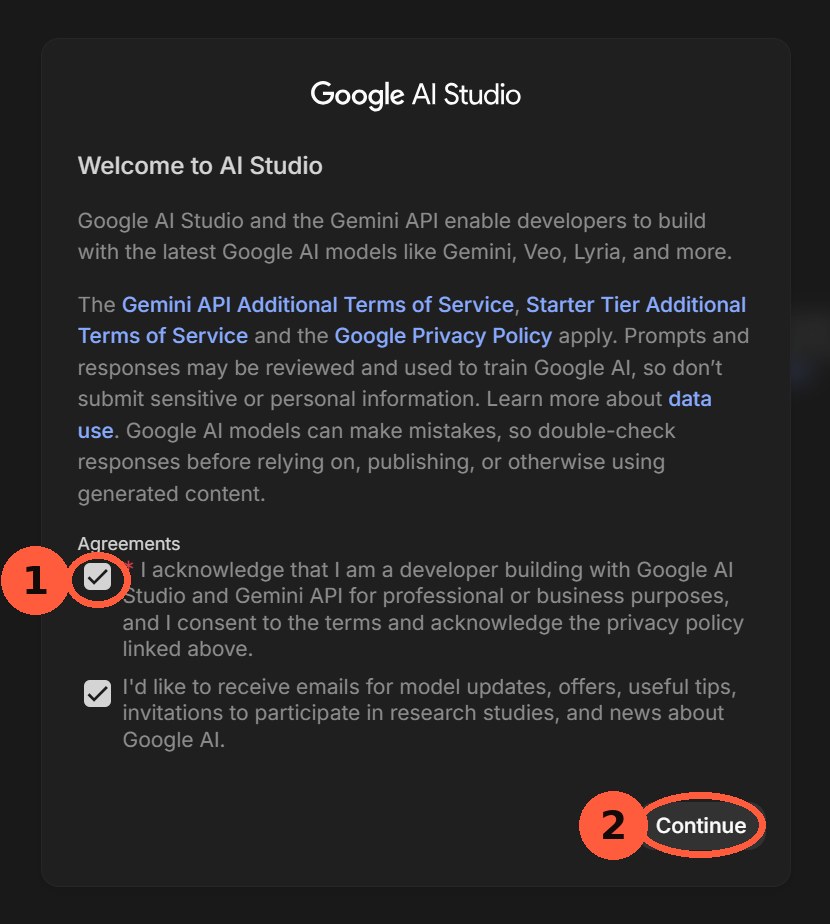
Check the agreement box, then click Continue. -
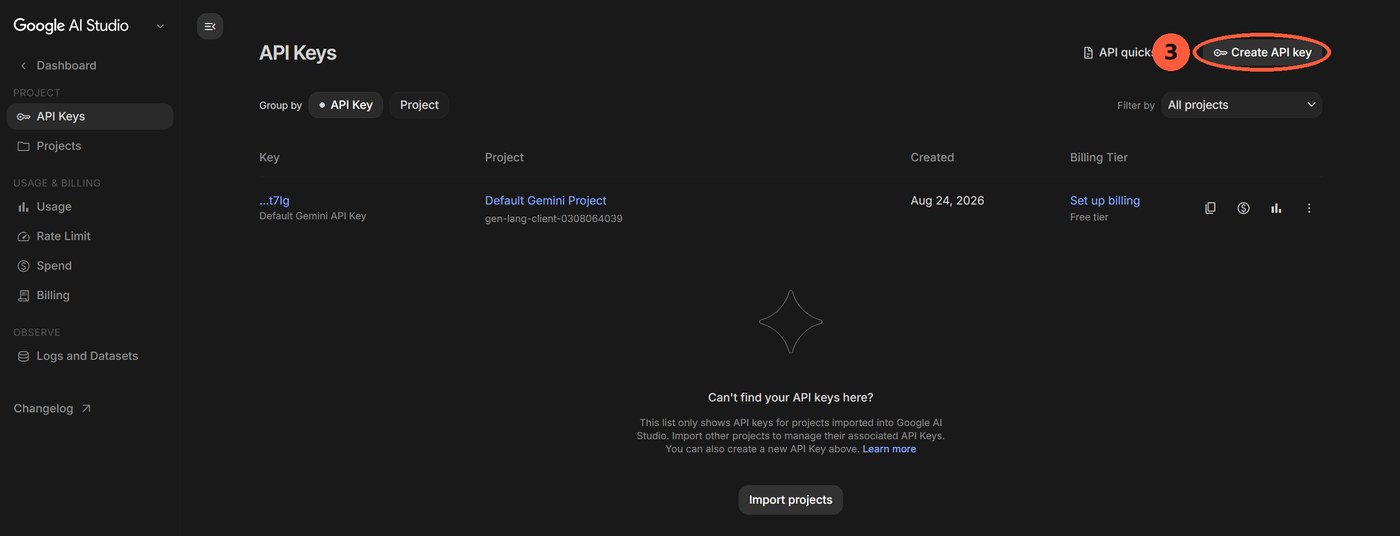
On the API Keys page, click Create API key. -
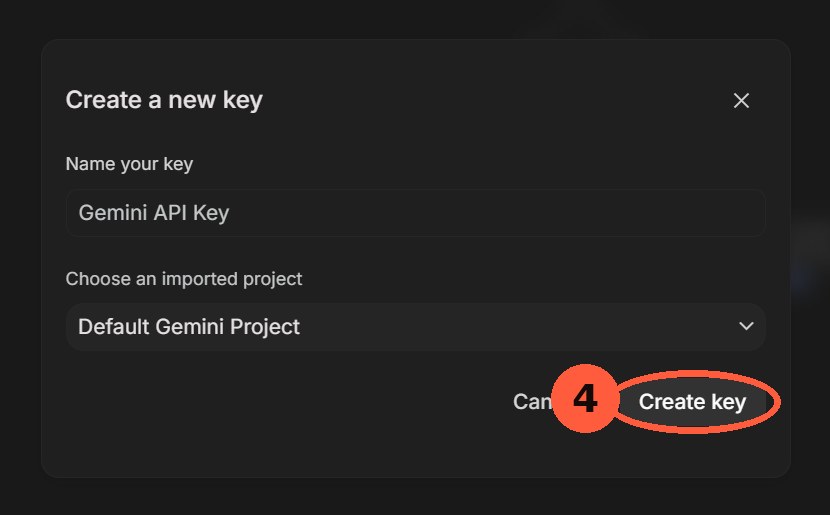
Name the key, pick a project, click Create key. -
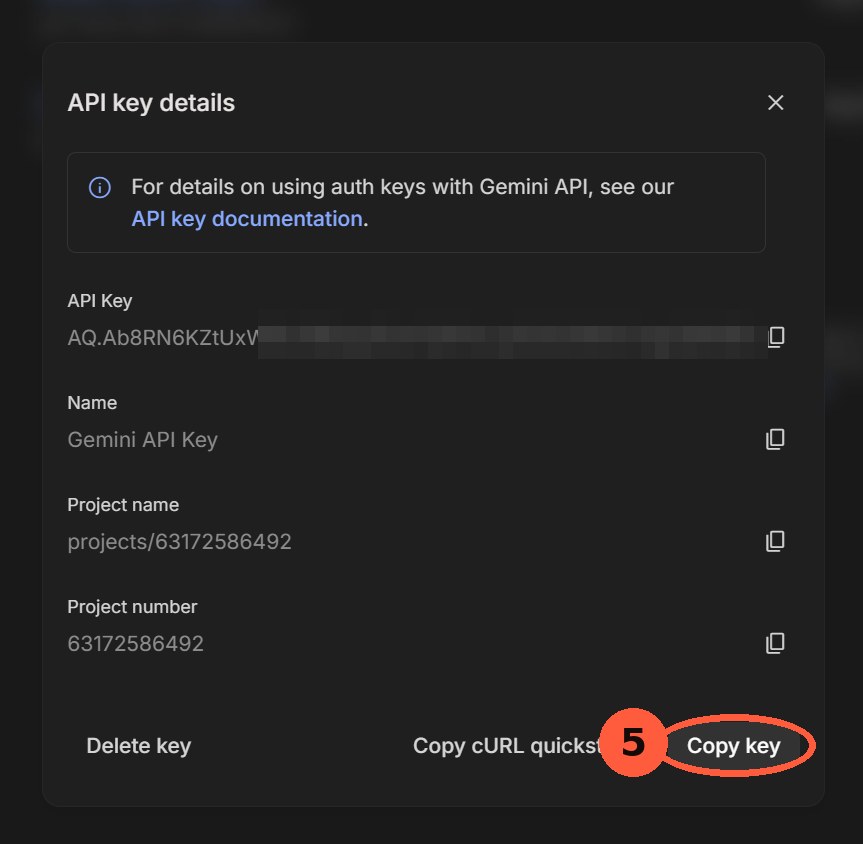
Copy the key now — but unlike some providers (OpenAI, DeepSeek) that only ever let you copy a key once, Google keeps a copy button next to it in the API Keys list, so you can grab it again later too. (Blurred here for this screenshot only; yours won't be.) -
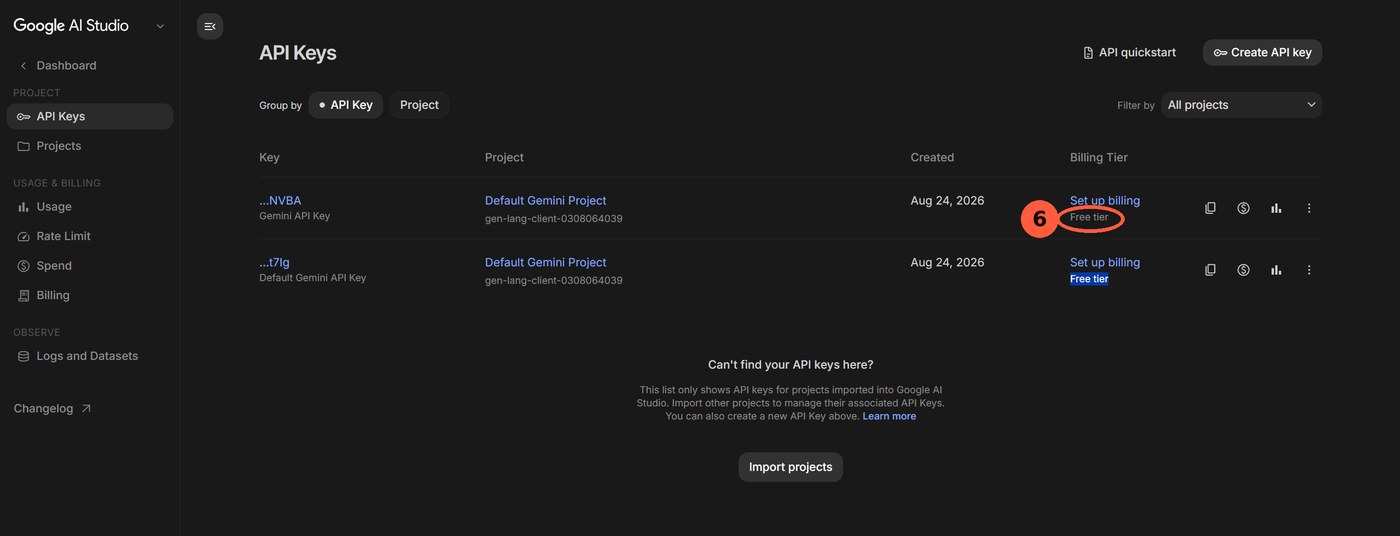
Back on the list, confirm the new key reads Free tier — no card attached.
02What "free" actually costs: your data
On the free (unpaid) tier, the prompts you send and the responses you get back may be used by Google to improve its products and machine-learning models.[3]
Once a project has a Cloud Billing account attached and moves to a paid tier, that same traffic is excluded from being used to improve Google's products.[3]
In other words, "free" here doesn't mean "no cost" — it means you're paying with data instead of money. That's worth knowing before you route anything sensitive through a free-tier key.
03Three limits apply at once, not one
Every free-tier call is checked against three independent ceilings simultaneously: requests per minute (RPM), tokens per minute (TPM), and requests per day (RPD).[4]
Hitting any one of the three — not just the daily count — is enough to get your next call rejected until that specific window clears.[4]
The exact numbers differ per model, and Google does not promise they'll stay the same — it states that limits depend on your tier and account status and can change automatically as those change.[4]
Not every model is included in the free tier at all — which models are free, and which are paid-only, is listed on Google's own pricing page rather than the rate-limit page.[5]
See today's exact numbers ↗04The daily counter resets on a clock, not a timer
The requests-per-day count resets at midnight Pacific Time — a fixed point on the clock, not "24 hours after your first call of the day."[4]
Converted: that's roughly 4pm–5pm Korea time (KST, UTC+9), depending on whether the US is on daylight saving — so a key that runs dry in the Korean morning won't refill until Korean late afternoon, not at midnight KST.
05The quota belongs to the project, not the key or the person
Rate limits are enforced per Google Cloud project. Creating additional API keys inside the same project does not create additional quota — every key in that project draws from the same pool.[4]
A project's tier — Free, or Tier 1/2/3 once paid — is determined automatically from that project's billing status and cumulative spend history.[6]
06So does making more projects get you more free quota?
Structurally: yes — because the limit is attached to the project, a genuinely separate Google Cloud project starts with its own separate free-tier pool.[4]
But Google runs both automated and manual abuse monitoring across the Gemini API and AI Studio, and a project that keeps showing suspicious usage patterns can be flagged for manual review.[7]
Logs are retained separately for up to 55 days specifically for detecting and preventing violations of Google's usage policies.[7]
Exactly where "spin up a few personal projects" ends and "policy violation" begins isn't spelled out in one clean sentence anywhere — that line lives in the Terms of Service themselves, not in this summary, so read the source directly before you build anything that depends on it.
07Outgrowing the free tier
Attaching a Cloud Billing account to a project is what moves it off the Free tier onto usage-based paid tiers.[6]
Paid tiers raise the RPM/TPM/RPD ceilings substantially over the free tier, and a project can climb further (Tier 1 → 2 → 3) automatically as its billing history accumulates.[4]
Billing itself doesn't cost anything to turn on — but once a project has a Cloud Billing account attached, its free tier is gone for good. From that point on, every call on that project is billed at Google's published per-token rates, not just the usage beyond the old free limits.[6]
References
- Gemini API keys — how a key is created, and that no billing is required to startai.google.dev/gemini-api/docs/api-key
- Google AI Studio — the "Get API key" screen itselfaistudio.google.com/apikey
- Gemini API Additional Terms of Service — the "Paid Services" vs. unpaid-service data-use clauseai.google.dev/gemini-api/terms
- Rate limits — the "Free Tier" section: RPM/TPM/RPD definitions, per-project scope, midnight-PT reset, tier upgrade pathai.google.dev/gemini-api/docs/rate-limits
- Pricing — the per-model table showing which models are free vs. paid-only, and paid per-token ratesai.google.dev/gemini-api/docs/pricing
- Billing — how attaching a Cloud Billing account changes a project's tierai.google.dev/gemini-api/docs/billing
- Abuse monitoring — automated/manual detection and the 55-day log-retention windowai.google.dev/gemini-api/docs/usage-policies